
Nginx can't process PHP on its own. You have to tell it how to hand the work over to PHP-FPM. We'll look at how they communicate and how to configure them together.
How Nginx and PHP communicate
Nginx is a web server, but it can't process PHP files. To handle them, it passes the request to a FastCGI server running the PHP application, then that FastCGI server sends the response back to Nginx, and Nginx returns it to the user.
FastCGI is a protocol for communication between an HTTP server and a separate piece of software. It's based on the CGI standard (Common Gateway Interface), which specifies how to pass the request from the HTTP server to the program, and how to collect the generated response.
PHP has FPM (FastCGI Process Manager) to interface a web server with PHP. FPM is a FastCGI implementation with extra features useful for heavily loaded sites.
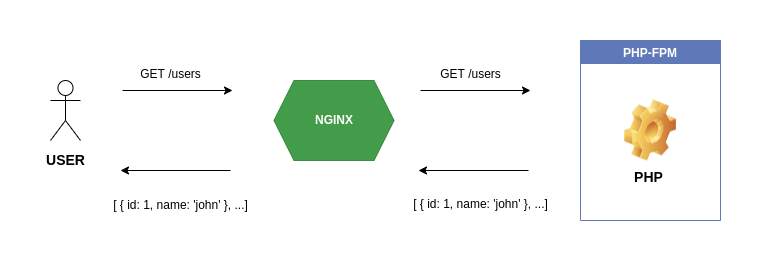
Nginx and PHP-FPM run independently, and they can talk to each other through their implementation of the standard FastCGI imposes. Since FastCGI is a protocol, any language with network socket support can implement it, Go, Python, and so on.
Configuring Nginx & PHP
The configuration comes down to routing requests to PHP-FPM (the FastCGI server) with a few parameters. Nginx includes a FastCGI module and can pass
requests to a FastCGI server through the fastcgi_pass directive.
To pass the requests, Nginx needs to know the address where PHP-FPM listens for FastCGI requests. That address can be a Unix socket or a TCP socket, and to identify it you open the PHP-FPM configuration.
Open the PHP-FPM configuration file:
# Change "8.1" to your own PHP version
sudo vim /etc/php/8.1/fpm/pool.d/www.conf
The listen parameter gives the address, and by default it listens on the Unix socket:
listen = /run/php/php8.1-fpm.sock
# The user and group allowed to communicate
listen.owner = www-data
listen.group = www-data
To make PHP-FPM listen on a TCP socket, set the IP address and port in the listen parameter.
# Listen on localhost port 9000
listen = 127.0.0.1:9000
# Only localhost can connect to PHP-FPM
listen.allowed_clients = 127.0.0.1
In the Nginx configuration:
location ~ \.php$ {
  # Nginx includes a ready-made snippet with the parameters php fastcgi needs.
  include /etc/nginx/snippets/fastcgi-php.conf;
  fastcgi_pass unix:/run/php/php8.1-fpm.sock;
  # fastcgi_pass 127.0.0.1:9000;
}